


Poll Everywhere
3.4147.00 Reviews
App Specs
- Version
- v15
- Updated On
- License
- Free
- Downloads
- 1,000,000+
- Developer
- Poll Everywhere Services
- Categories
- Business
- Platform
- Android
Screenshots
 Analysis by AppCompare
I found Poll Everywhere most useful when a group needs to answer the same question at the same moment without passing around a microphone, paper, or shared computer. It is a business-focused mobile app from Poll Everywhere Services, built for responding to live activities from a phone or tablet. That sounds narrow, and it is, but the narrow purpose is also its strength: when a presenter has already created an activity, the app can turn each participant’s device into a quick response tool.
My household-style test was less about replacing a family organizer and more about seeing how the app behaves when several people share a room, a meeting, or a single event. Imagine a parent explaining a weekend plan, a volunteer coordinating a community gathering, or a small team deciding which idea to discuss first. Everyone can respond from their own device instead of trying to speak over one another. The app makes the most sense as a companion to a live session, not as a standalone place for planning, messaging, or storing family information.
It is free to use and suitable for Everyone, which makes it approachable for mixed-age groups in a general sense. Still, an age label should not be confused with a complete household-safety system. I would treat the app as a participation tool and make sure a responsible organizer controls the activity, the questions, and the setting. That distinction matters when children, guests, or people unfamiliar with live polling are using the same room.
How Poll Everywhere works in a shared setting
I’d use Poll Everywhere in a shared setting when one person is guiding a discussion and everyone else needs a straightforward way to contribute. Before opening the activity, I’d agree on who is leading, what the responses will help decide, and how anyone without a working device can still take part. That simple ground rule keeps the focus on the conversation rather than the phones, and it leads to the more practical question of how to make the routine work.
One screen leads, many phones respond
The basic arrangement is simple. One person presents an activity, while other people use their phones or tablets to submit responses. In a meeting, the presenter might ask the group to choose a priority. In a workshop, the question could check whether everyone understands the previous point. At home, it could be a light decision about dinner or a trip, provided the organizer has prepared the activity and is ready to guide the session.
I like this division because it gives the group a clear center of attention. The presenter’s screen remains the place where the question is explained, while each participant can answer privately from a personal device. That is more comfortable than asking everyone to announce an opinion aloud, especially when the subject is sensitive or when quieter people tend to be overlooked.
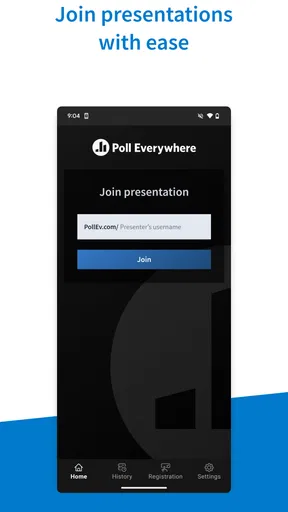
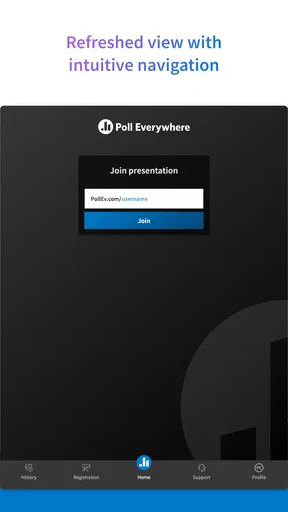
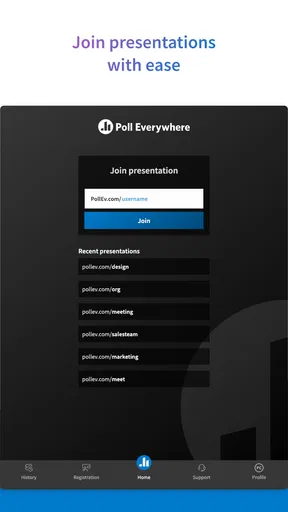
The important catch is that the mobile app is not a magic question generator. Its value depends on the live activity being available and understandable. If the presenter has not explained what participants should do, a new user may open the app and wonder where to begin. For a smooth session, I would display the joining instructions clearly, say whether answers are anonymous or identifiable if that distinction applies to the activity, and give people a moment to connect before starting the discussion.
Worth Reading Before You Choose

EA SPORTS FC Mobile 26 Is a Bigger Football Game, but It Takes Time

Flipboard Shows What News Apps Must Do Beyond the Feed

Switching to Android Auto Means Rethinking Your Driving Routine

Google Calendar Makes a Crowded Week Easier to Manage

Ludo King Makes the Most of the Minutes Between Plans

Baby Panda World Brings Quick Play to Modern Phones, but Its Game Library Feels Busy
A realistic household scenario
Consider a shared tablet on a kitchen table and several phones around the room. A parent has prepared a short poll for a family conversation about a holiday itinerary. Each person chooses the activity they prefer, and the results give the family something concrete to discuss. The app does not make the decision automatically, but it prevents the loudest person from becoming the only person heard.
For a volunteer group, the same pattern is more practical. A coordinator can ask which task needs attention first, collect responses while people are seated, and then use the result to organize the conversation. In a small business, a presenter can check whether a team wants more explanation before moving on. These are modest uses, but they show where the app earns its place: it reduces the friction between asking a live question and collecting a roomful of answers.
I would not use it as a replacement for a shared calendar, family chat, task manager, or private survey system. Those tools are better when people need to respond at different times, attach detailed context, or return to a decision later. Poll Everywhere is designed around the energy of a live activity. If everyone is not present or ready to participate, much of its advantage disappears.
Setup boundaries worth understanding
Before inviting other people, I would separate the presenter’s responsibilities from the participant’s experience. The person running the session needs to prepare the activity and explain the joining process. The participant mainly needs a compatible phone or tablet and enough attention to follow the live instructions. This boundary keeps the app easy for guests, but it also means the organizer carries most of the burden when something goes wrong.
That is especially noticeable in a household with shared devices. If siblings use the same tablet, I would avoid assuming that the device itself represents a particular person. A participant should know whose response is being submitted, and the organizer should explain whether people need separate access or whether the activity accepts responses in another way. The app can support a group response moment, but it should not be treated as an account-management solution for a family.
My practical advice is to test the activity before the real session. Check that the presenter can display the question, that participants know where to respond, and that everyone understands when the activity is open. This small rehearsal is more valuable than asking a room full of people to troubleshoot at once. It also reveals whether the question is too long for a phone screen or whether the wording could lead to different interpretations.
Coordination without turning the room into noise
Live polling can improve coordination, but only when the presenter controls the rhythm. I would introduce one activity at a time, pause long enough for slower users, and explain what happens after responses arrive. If the group sees results immediately, the presenter should be prepared for those results to change the conversation. A poll is not merely a button people press; it can expose disagreement, uncertainty, or a preference that nobody expected.
One useful workflow is to ask for an initial response, discuss the result, and then ask a second question after the explanation. That can show whether the group’s understanding changed. It is more informative than using the app only to collect a final vote. The trade-off is that this approach demands preparation and moderation. Without a clear purpose, repeated questions can feel like busywork.
Another practical insight is to keep a backup verbal method ready. A participant may have a flat battery, a poor connection, difficulty reading the screen, or simply need help joining. A person should not be excluded from a decision because the mobile step failed. I see Poll Everywhere as an addition to human coordination, not a reason to remove every other way of contributing.
Age, trust, and the limits of a general audience label
The Everyone rating makes the app broadly approachable, but the content of a live activity comes from the organizer. A harmless question for a workplace training session may not be suitable for young children, while a family activity may be too informal for a professional audience. I would judge the session, not just the app label, before handing a device to a child.
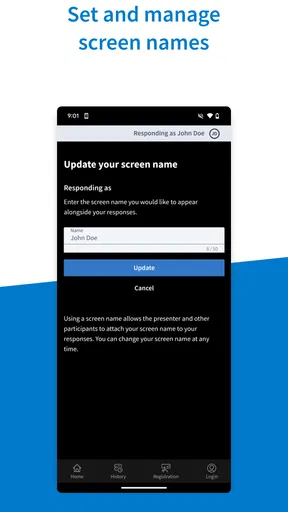
Trust also depends on how the presenter handles responses. If people are expected to share an honest opinion, the group should understand how answers will be used and whether names are visible in that particular activity. I would avoid asking for private details in a casual shared-device setting. A poll can feel quick and harmless, yet the answer still represents a person’s view and deserves sensible handling.
For parents, the main boundary is supervision rather than a dedicated family-control experience. I would explain the activity beforehand, stay nearby with younger users, and avoid letting children respond to unfamiliar sessions without knowing who organized them. For adults sharing a device, I would sign out or switch users where appropriate instead of assuming the next person will see a clean personal space.
Where the app feels stronger than ordinary alternatives
Compared with a show of hands, the app gives quieter participants a more direct way to respond and can collect answers from people who are not sitting close to the presenter. Compared with a group chat, it keeps the question and response moment together instead of burying the decision among unrelated messages. Compared with a traditional form, it is better suited to a presenter who wants the room to react while the discussion is happening.
Those advantages come with clear limits. A group chat is usually more natural for ongoing household coordination. A form is often better for detailed information collected over a longer period. A shared document is better when several people need to edit a plan. Poll Everywhere wins when timing matters and the organizer wants a visible, structured response during a live activity.
I also found that the app’s simplicity can work against it if expectations are too high. Someone looking for a complete collaboration suite may find the experience too focused. Someone who only needs a quick family vote may consider opening a specialized app unnecessary. The right choice depends on whether the live presentation is important enough to justify the extra step.
What the current app suggests about maturity
The app has been available since August 6, 2014, and the current version is v15. That history makes it feel like an established tool rather than a brand-new experiment, while the mobile experience remains centered on its original job: responding to live activities. It has more than one million installs, which suggests that the use case extends well beyond a single household, but popularity does not remove the need to check whether the workflow suits your group.
Its average rating is 3.4 from around 1,400 ratings, with roughly 147 written reviews. I read that as a sign to keep expectations realistic. The concept is easy to understand, but live participation apps are sensitive to setup quality, device differences, and the presenter’s instructions. A disappointing session may reflect the activity or the coordination around it as much as the response screen itself.
Because it is free, trying it for a small, low-pressure activity is reasonable. I would not begin with an important vote or a large event. Start with a simple question, let everyone respond, and observe whether the group understands the flow. That trial tells you more than the app’s description because the real test is whether your particular participants can join without confusion.
Who should use it, and who should skip it
I would recommend it to presenters, teachers, workshop leaders, team coordinators, and families who occasionally need structured input while everyone is together. It is particularly useful when speaking aloud would favor confident participants, or when the organizer wants a quick visual sense of the room before deciding what to discuss next.
I would skip it if your main need is private long-form feedback, asynchronous planning, permanent household records, or direct conversation. I would also hesitate if the group includes people who cannot comfortably use a phone and there is no alternative response method. The app should make participation easier, not turn device access into a requirement.
For a small home, the best use is occasional and intentional. Prepare a question that genuinely needs everyone’s input, explain the rules, and close the loop by saying what the group will do with the result. If the answer has no effect on anything, people may quickly stop taking the activity seriously.
My household verdict
Poll Everywhere is a focused business app that can also work in shared, informal settings when a live question needs many individual answers. I appreciate that it gives a group more structure than shouting suggestions across a room, and I like the way it can include quieter participants without forcing them to perform publicly.
At the same time, I would not install it expecting a family hub, parental-control system, or all-purpose communication tool. The organizer must provide the context, protect the boundaries of the session, and help anyone who struggles with the mobile workflow. Those are not minor details; they determine whether the experience feels smooth or awkward.
My final view is positive but specific: choose Poll Everywhere when the moment is live, the question is clear, and a presenter is ready to coordinate the room. For everything that happens before or after that moment, a chat, calendar, form, or shared document may be the more natural choice. Used within its proper boundaries, this free app is a practical way to make group participation more balanced and easier to organize.
Pros
- Live responses appear instantly
- keeping presentations interactive.
- Supports polls
- Q&A
- quizzes
- word clouds
- and clickable images.
- Audience members can often participate without creating an account.
- Works with presentation tools such as PowerPoint
- Keynote
- and Google Slides.
- Moderation tools help presenters review questions before displaying them.
Cons
- Free plans limit the number of responses and available presentation features.
- Some advanced options require a paid subscription.
- A stable internet connection is essential for live participation.
- Large audiences may find the interface less intuitive on smaller screens.
- Response data and presentation controls can feel overwhelming for new users.
FAQs for Poll Everywhere
What is Poll Everywhere used for?
Poll Everywhere is an interactive presentation and audience-response platform that lets presenters ask questions and collect live feedback from participants. You can create polls, quizzes, word clouds, Q&A sessions, and surveys, then display responses in real time. It is commonly used in classrooms, meetings, conferences, training sessions, and virtual events to encourage participation.
Do participants need to install the Poll Everywhere app?
Not always. Participants can usually respond through a web browser using a presenter-provided link or activity code, while the mobile app offers a more convenient experience on Android and iOS. Depending on how the event is configured, participants may also respond by text message. Installing the app is useful for frequent participation, but it is not necessarily required for every activity.
Is Poll Everywhere free to use?
Poll Everywhere offers a free plan, but it includes limitations that may affect larger classes, teams, or professional events. Restrictions can apply to the number of participants, available activities, reporting features, branding, and presentation options. Paid plans provide expanded capacity and additional tools. Before downloading or subscribing, check the current pricing and plan limits because they can change over time.
What types of polls and activities can be created?
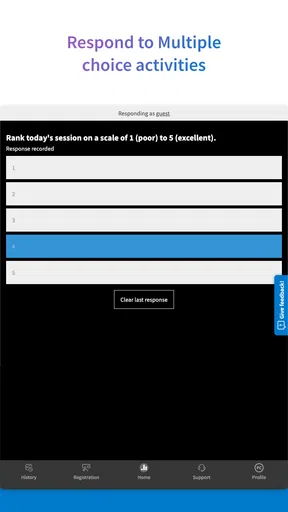
The platform supports several interactive formats, including multiple-choice questions, ranking activities, clickable images, Q&A, surveys, competitions, and word clouds. These options make it possible to gather quick opinions, test knowledge, organize audience questions, or visualize common themes. The exact features available may depend on the account plan, and some advanced reporting or customization tools may require a paid subscription.
Is Poll Everywhere suitable for private or sensitive information?
Poll Everywhere includes settings that can help presenters control participation, moderate responses, restrict access, and choose whether answers are anonymous or identified. However, it should not automatically be treated as a secure system for highly confidential, medical, financial, or legally sensitive data. Review the platform’s privacy policy, organizational requirements, and account settings before collecting personal information from participants.


